Subscribe: RSS | Advertise? | Need a website for your small business?



Merge the content of two or more cells in Excel into one cell with this online tool without losing data. Combining two or more cells is easy, whether its text, numbers or formula data. This means you can merge cells without losing data. There are a few different merges you can do, including one that can make email addresses out of a spreadsheet containing just first names and last names! Once the cells have been merged or joined, rows are maintained so that you can copy and paste back into Excel or Word or anywhere else you need it. Works with all versions of Excel 2003, Excel 2007 or Excel 2010. It is also known as concatenating cells or columns. Please note your merges are neither recorded or stored.
Perfect for merging or combining 'first names' with 'last names' in separate columns into one cell. You can merge or join more than two cells together in this way no matter what the information is.

Merge cells into one with spaces
You may have rows of addresses split up into separate columns, eg house, street, town, etc that you want to join into one cell or line. But you want to separate each part of the address with a comma. The tool lets you use other characters too.

If you dont want a space between words or data. Ideal for product codes for example.
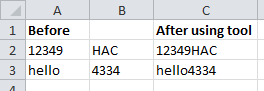
Perfect if you want to merge the cells in a row into one cell, separating each word by a character instead of a space.

Merge cells with character separation
If you have rows of names and you want to convert them into email addresses you can do with this merge. There is an option to merge with or without a dot inbetween the names.
